![Sportal365 logo-4.png]](https://knowledge-base.sportal365.com/hs-fs/hubfs/Sportal365%20logo-4.png?height=40&name=Sportal365%20logo-4.png)
If your account has access to more than one project, you can switch between them from any screen of the CMS. The project switcher at the top right always shows which project you are working in, and it also holds your quick settings, such as the interface language.
Opening the project switcher
- At the top right of any screen, select the project switcher. It shows a status dot, the name of your current project and a chevron.

- A panel opens on the right. Under CURRENT PROJECT, you see the project you are working in now.
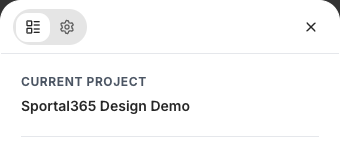
The panel has two tabs at the top: the project list, which opens first, and the gear tab with QUICK SETTINGS. To close the panel without changing anything, select the X at its top right.
Switching to another project
- Open the project switcher.
- Under AVAILABLE PROJECTS, find the project you want to work in. The list shows the projects your account has access to.
- Select the project. The CMS switches to it straight away, closes the panel and opens the Dashboard of that project.
There is no confirmation step: selecting a project in the list switches to it immediately and takes you to the Dashboard. Save any changes on the screen you are working on before you switch.
What switching affects
Each project has its own content and settings. After you switch, the lists and pages in the CMS, such as articles, videos, galleries, images, lists, categories, tags and authors, show what belongs to the selected project, and the project switcher shows its name. Before you create or edit content, check the project switcher to make sure you are working in the right project.
Changing the interface language
- Open the project switcher and select the gear tab.
- Under QUICK SETTINGS, open the Language dropdown.
- Choose English or Bulgarian. The CMS interface switches to the selected language.
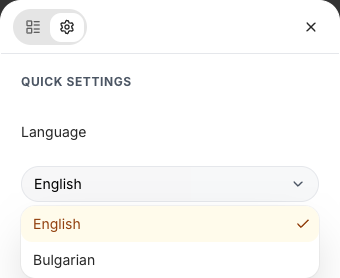
You can open the same settings from your account card: select the card at the bottom of the sidebar, then select Language. To return to the project list, select the first tab at the top of the panel.